
Quick guide · 4 steps
Text orders: Valérie’s method
Copy her message, replace the products, and send it. Customers reply to the Farmzz number, you receive an alert, and every actionable reply stays tied to the text that triggered it.

Copy this text
Only replace your name, farm, and products. Keep the instruction asking customers to reply to the Farmzz text.
Recommended template
Hi [first_name],

It’s [your first name] from [farm name]!

Our surplus this week:
[Product 1]
[Product 2]
[Product 3]
[Product 4]

To order, reply to this Farmzz text with the products and quantities you want.
See the detailed template Valérie used
Version with formats
Hi [first_name],

It’s [your first name] from [farm name]!

Looking for something fresh? Here is our surplus:
Garlic scapes (bunch and 1 kg)
Tomatoes
Cherry tomatoes (box and 1 kg)
Peppers
Eggplant
Green onions
Cucumbers
Zucchini

To order, reply to this Farmzz text with the products and quantities you want.Send it with Farmzz
- NotificationsOpen the Notifications section.
- New SMSPaste the template and choose subscribers.
- SendCheck the products and the text preview.
Expect these two replies
Customers reply to the same Farmzz text with either an order or a question.
The two texts customers see
First they receive your farm notification. After they reply, Farmzz confirms that the farm has been notified.
Text 1 — your farm notification
Hi Helen, it’s Valerie from Jardins de givre!

Our surplus this week: cherry tomatoes, garlic scapes, cucumbers and zucchini.

To order, reply to this Farmzz text with the products and quantities you want.
Text 2 — Farmzz confirmation
Thanks! You replied to Farmzz’s automated number.

I’ve just notified the farm about your reply.
At the same time, you receive an alert
For an order or question, Farmzz sends you the customer’s name, phone number and complete message.
Farmer alert
Order to prepare

From: Helen
Phone: [customer number]
Message:
“I’ll take 4 boxes of cherry tomatoes and 3 bunches of garlic scapes.”
Open the sent notification
In Farmzz, open Notifications, then open the notification you just sent.
Customer replies groups every actionable reply tied to that notification. You can see the reply count, reply rate and anything left to review.
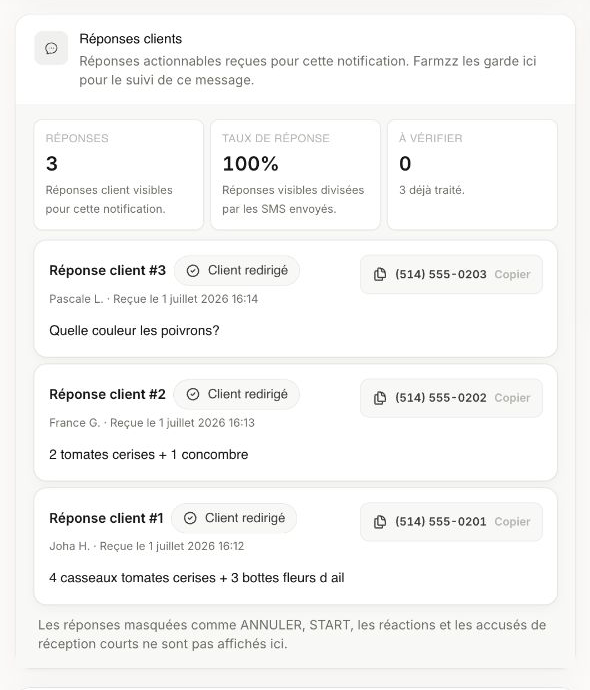
Each reply shows the customer’s name, time, message and phone number. Use Copy when you need the number.
Copy, send, then open the sent notification to track every actionable reply generated by that text.


